Best Goal Setting Apps in …
OKR
Best Goal Setting Apps in 2026: 7 Tools Compared and Ranked
Compare the 7 best goal setting apps for 2026. From personal habit tracking to team OKRs — find the right tool for your goals.
Contributor:

Serge Tikhonchuk
1 week, 4 days ago
Editor's Pick: If you want one goal setting app that covers personal, family, team, and enterprise goals — with built-in tasks, roles, and analytics — AimLinked is our top pick. For iOS-only personal habit tracking, go with Strides. For a fully free, gamified experience, try Habitica.
According to research by Gallup, fewer than one in three employees have clear, well-defined goals — and of those who do, most abandon them within weeks. For individuals, the attrition is worse: research by Norcross et al. found that 92% of people who set New Year's goals never achieve them. The problem is rarely motivation. It's structure.
A goal setting app provides that structure — along with accountability and visibility into your progress. The right goal setting software turns vague intentions into trackable outcomes. But with dozens of goal tracker apps available, choosing one that fits the way you work isn't easy.
We evaluated over 20 goal setting apps across criteria that matter most: framework support (OKR, SMART, custom), ease of setup, progress tracking, collaboration features, and pricing. Here are the 7 that stood out for 2026.
Table of Contents
- How We Evaluated These Apps
- Quick Comparison Table
- AimLinked — Best for Multi-Level Goal Tracking
- Strides — Best for Personal Habit Tracking
- Notion — Best for Customizable Goal Dashboards
- Weekdone — Best for Team OKR Reporting
- GoalsOnTrack — Best for Individual Goal Coaching
- TickTick — Best for Task-Integrated Goal Tracking
- Habitica — Best for Gamified Goal Tracking
- How to Choose the Right Goal Setting App
- Honorable Mentions
How We Evaluated These Apps
Not every goal setting app is built for the same purpose. A personal habit tracker works differently from an enterprise OKR platform. To provide a fair comparison, we tested each app by creating the same set of goals — three personal objectives, two team OKRs, and one quarterly business target — and tracked them for at least two weeks in each platform.
We scored each app across seven criteria:
- Goal framework support — Does it support OKR, SMART, or custom goal structures? We tested whether frameworks are built-in or require manual setup.
- Ease of setup — How quickly can you create your first goal? We timed the onboarding flow from signup to first goal created.
- Progress tracking — Visual dashboards, charts, streak tracking, or completion rates? We evaluated how easily you can see whether you're on track.
- Collaboration — Can you share goals with a team, family, or accountability partner? We tested sharing workflows and permission controls.
- Integrations — Does it connect with tools you already use? We checked native integrations and API availability.
- Pricing — Is there a free tier? What's the cost per user? We verified all pricing as of February 2026.
- Multi-platform — Mobile, web, and desktop availability? We tested the experience on each available platform.
Each app was evaluated independently by at least two reviewers. Scores reflect the consensus assessment across all criteria. We update this article quarterly to reflect pricing changes, new features, and shifts in the competitive landscape.
Quick Comparison Table
| App | Best For | Framework | Free Tier | Pricing | Collaboration |
|---|---|---|---|---|---|
| AimLinked | Multi-level goal tracking | OKR | Yes (generous) | Free / $7–$12/user/mo | Personal, family, team, enterprise |
| Strides | Personal habit tracking | Custom, SMART | 3 trackers | $4.99/mo or $29.99/yr | No |
| Notion | Customizable workspace | DIY (any framework) | Yes (generous) | Free / $10+/mo | Yes |
| Weekdone | Team OKR reporting | OKR | 3 users free | From $108/mo (10 users) | Teams only |
| GoalsOnTrack | Individual goal coaching | SMART | Free trial | $68/year | No |
| TickTick | Task-integrated goals | Custom | Yes (limited) | $35.99/yr | Basic sharing |
| Habitica | Gamified habit tracking | Custom | Yes | $4.99/mo premium | Group challenges |
Now let's look at what makes each goal setting app stand out — and where it falls short.
1. AimLinked — Best for Multi-Level Goal Tracking
Ideal for: Individuals, families, teams, and enterprises who want structured goal tracking that scales from personal objectives to company-wide OKRs
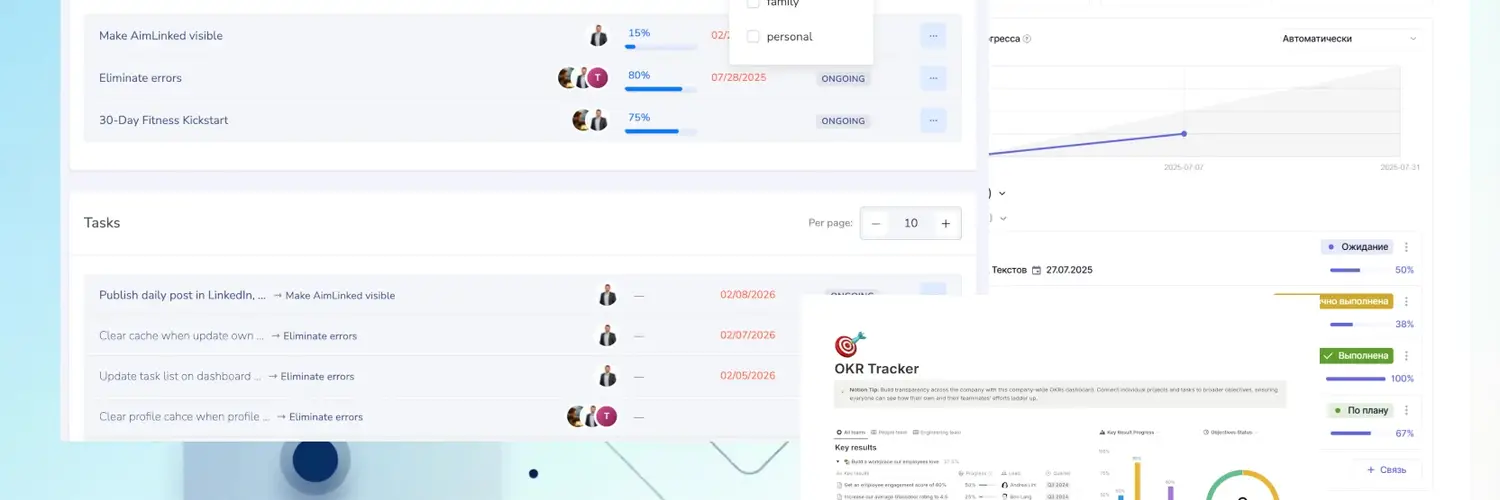
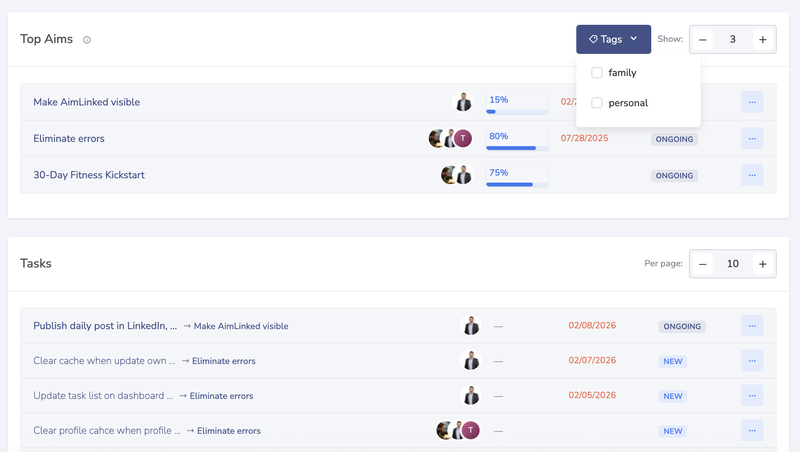
AimLinked is the most versatile goal setting app on this list, covering the full range of goal tracking — from personal objectives to enterprise OKR management — in a single platform. During testing, we ran a personal fitness goal, a family savings target, and a team quarterly OKR simultaneously. The Dashboard showed our top 3 goals with tasks prioritized by goal importance — not a wall of everything. We tagged goals by context (work, family, personal) and switched views to focus on what mattered in the moment. Most goal setting apps force you to choose between personal use and team use. AimLinked doesn't.
What AimLinked does well
- Priority Dashboard — Shows your top 3 goals and tasks ordered by goal importance, not by recency. Tag goals by context (work, family, personal) and switch views — at the office you see work priorities, at home you see family goals. Solves the common problem of doing easy tasks while important goals wait.
- Goals → Key Results → Metrics — Setting a goal is easy. Knowing you're on track is harder. AimLinked implements the full pipeline: define what you want (goal), how you'll know you achieved it (key result), and track real numbers over time (metric). Progress is calculated automatically — no manual percentage updates.
- Goal hierarchy — Structure goals as Objectives → Key Results → Initiatives, the same framework pioneered by Andy Grove at Intel and later popularized by John Doerr at Google. This isn't just for corporations; the OKR structure works equally well for personal goals like fitness milestones or learning targets.
- Assign goals to any profile — Assign a goal to a person, a family group, a department, or your entire company with a single action. Participants then create their own sub-goals and tasks. A family vacation goal becomes a shared project where each member takes their part.
- Initiatives bridge goals to execution — Unlike most goal setting apps that stop at "track progress," AimLinked includes built-in tasks, projects, and programs linked directly to goals. Participants log effort on initiatives, and supervisors can confirm or reject — creating a complete goal-to-work pipeline.
- Six participant roles — Observer, Member, Owner, Admin, Supervisor, and Deputy Supervisor, each with granular permissions. No other app on this list offers this depth of role control. A family member can be an Observer on your fitness goal while being a Member on a shared savings goal.
- Approval workflows with audit trail — On the Corp plan, goals follow a structured lifecycle (Draft → Proposed → Approved → Ongoing → Completed → Confirmed). When bonuses, promotions, or project funding depend on goal completion, this prevents silent changes to commitments and creates a documented record both sides can point to.
- Multi-segment support — Use it solo for personal goals, share goals with your family, align your team, or deploy enterprise-wide with approval workflows and audit trails. One tool that scales with your needs.
- Built-in CRM, calendar, and chat — Manage contacts, schedule meetings, and communicate with your team without switching tools. Unusual for a goal setting app, but practical for teams that want to consolidate.
- Free tier — More generous than most competitors. The free plan includes unlimited personal goals, teams and groups, charts and analytics, tasks and effort tracking, Observer and Member roles, 5 metrics with 100 assessments each, and CSV import — with no time limit.
Where it could improve
- Growing community — public goal discovery exists, but no forums, templates marketplace, or peer-shared goal libraries yet
- Thin integration layer — no native connections to Slack, Jira, or Google Calendar at the time of review
- Web-only for now — no native mobile apps yet (works in mobile browsers, PWA planned)
Pricing
Free plan: Unlimited personal goals, teams and groups, charts and analytics, tasks with effort tracking, Observer and Member roles, unlimited metrics with up to 1000 assessments each, and CSV import (100 rows). Pro plan: $7/user/month — adds full goal hierarchy, Owner (Lead) role, metrics, and 10,000 assessments per metric. Corp plan: $12/user/month — adds Supervisor, Admin, and Deputy Supervisor roles, approval workflows, audit log, org structure alignment, unlimited metrics, private server deployment, and priority support. See full pricing details.
Best for: Anyone who wants a single goal setting app that works at every level — personal habits, family savings, team OKRs, or enterprise-wide goal programs — with a priority-focused dashboard, measurable key results, goal assignment to any profile, and built-in tasks, roles, and analytics.
2. Strides — Best for Personal Habit Tracking
Ideal for: Individuals focused on building daily habits and tracking personal milestones
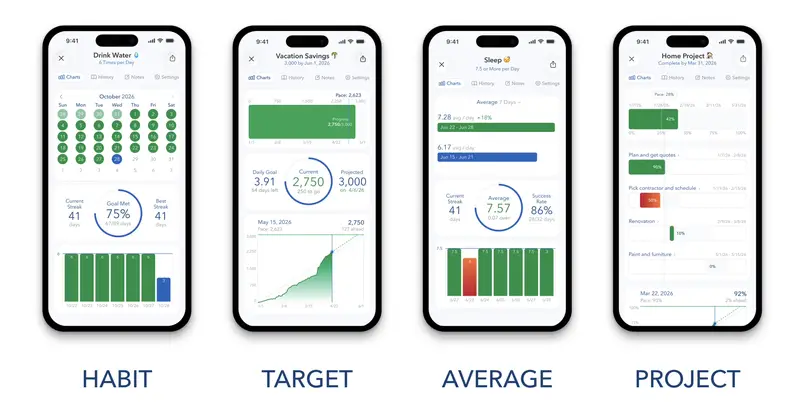
Strides is a focused, visually clean goal tracker app built for personal use. It's available on iOS (iPhone, iPad, Apple Watch) with a Mac app in development. In our testing, we had a "read 30 books this year" Target and a daily "meditate" Habit running simultaneously — the pace indicator accurately predicted we'd miss the reading target at our current rate, which prompted us to adjust.
What Strides does well
- Four tracker types — Habit (daily streaks), Target (reach a number by a date), Average (track recurring metrics like weight or spending), and Milestone (project with steps). This flexibility covers most personal tracking needs.
- Visual progress — Clean charts, streak calendars, and an "on-track pace" indicator that tells you whether your current rate will hit your deadline. When the pace indicator told us we'd miss our reading target, we adjusted the same day.
- Template library — 10 categories of pre-built goal templates covering health, fitness, finance, productivity, and more.
Where it falls short
- Apple-only — No Android or web version. If you switch phones, you lose access.
- No collaboration — Purely individual. You can't share goals with a partner, family, or team.
- Limited free tier — Only 3 trackers on the free plan. Strides Plus ($4.99/mo or $29.99/yr) unlocks unlimited tracking.
Pricing
Free: 3 trackers | Strides Plus: $4.99/month, $29.99/year, or $79.99 lifetime
Best for: iOS users who want a focused, visually appealing goal setting app for personal habits — and don't need team features.
3. Notion — Best for Customizable Goal Dashboards
Ideal for: Power users who want to build their own goal tracking system from scratch
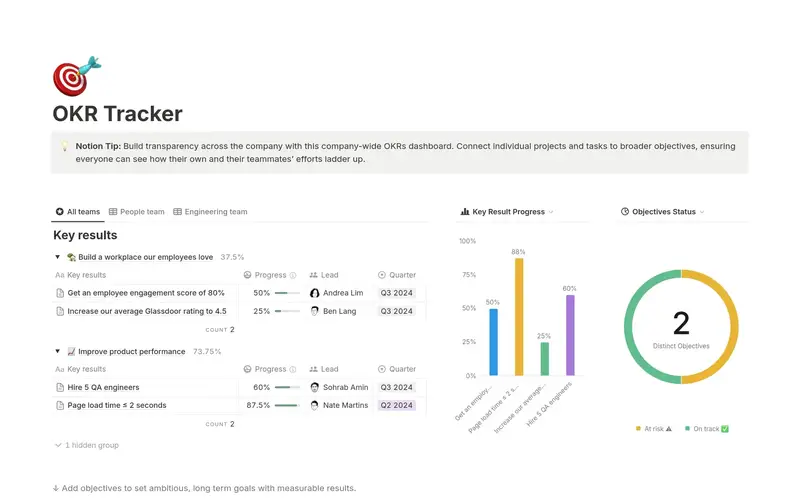
Notion is not a dedicated goal setting app — it's a flexible workspace you can turn into a goal tracker. And many people do. We spent about 45 minutes building a quarterly OKR board using a community template and customizing the properties — it worked, but required significantly more setup than purpose-built alternatives. Notion's databases, templates, and linked views let you build anything from a simple goal list to an elaborate "Life Dashboard."
What Notion does well
- Total flexibility — Support any framework (OKR, SMART, custom) by building your own database structure. If you can imagine it, you can build it in Notion.
- Rich ecosystem — Thousands of community templates, including goal trackers, habit trackers, and OKR dashboards you can import with one click.
- Generous free tier — Unlimited pages and blocks for personal use.
- Integrations — Connects with most productivity tools via API and Zapier.
Where it falls short
- Setup overhead — You need to build (or find and customize) your goal tracking system. There's no "create a goal" button — you're designing the experience from scratch.
- No built-in goal logic — Notion doesn't understand what a "goal" or "key result" is. It doesn't calculate completion rates, suggest milestones, or track streaks natively. You manually update everything.
- Overwhelming for simple needs — If you just want to set 3 goals and track progress, Notion's flexibility becomes overhead.
Pricing
Free: Personal use | Plus: $10/month | Business: $18/month
Best for: People who already use Notion and want to consolidate everything in one workspace. Not ideal if you want a dedicated goal setting app with built-in frameworks.
4. Weekdone — Best for Team OKR Reporting
Ideal for: Teams of 5-50 people who need structured OKR tracking with weekly check-ins
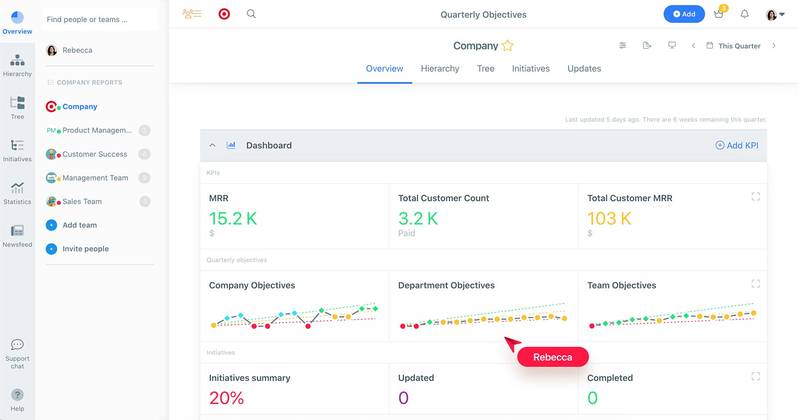
Weekdone has been in the goal setting app space since 2013, making it one of the longest-running dedicated OKR tools. It's designed around a weekly rhythm: teams set OKRs, log weekly progress, and review alignment through dashboards. When we tested it with a 4-person team, the weekly check-in emails kept everyone aware of each other's progress without needing a separate meeting.
What Weekdone does well
- OKR coaching included — Paid plans come with personalized OKR coaching from experts, which is particularly valuable for teams new to the methodology.
- Weekly planning flow — The structured weekly check-in process (plans, progress, problems) keeps teams aligned without excessive meetings.
- Integrations — Connects with MS Teams, Slack, Jira, Asana, and more via native integrations and Zapier.
- Company-wide dashboards — Visual alignment trees show how individual OKRs connect to company objectives.
Where it falls short
- Team-only — No personal goal tracking. It's built for organizations, not individuals.
- Expensive for small teams — The free plan covers only 3 users. After that, pricing starts at $108/month for 10 users ($10.80/user/month).
- OKR-only — If your goals don't fit the OKR framework, Weekdone feels rigid.
Pricing
Free: 3 users (all features) | Paid: from $108/month for 10 users, scaling with team size
Best for: Small-to-medium teams who want a goal setting app with OKR coaching and guided implementation.
5. GoalsOnTrack — Best for Individual Goal Coaching
Ideal for: Self-improvement enthusiasts who want a structured, SMART-based approach to personal goals
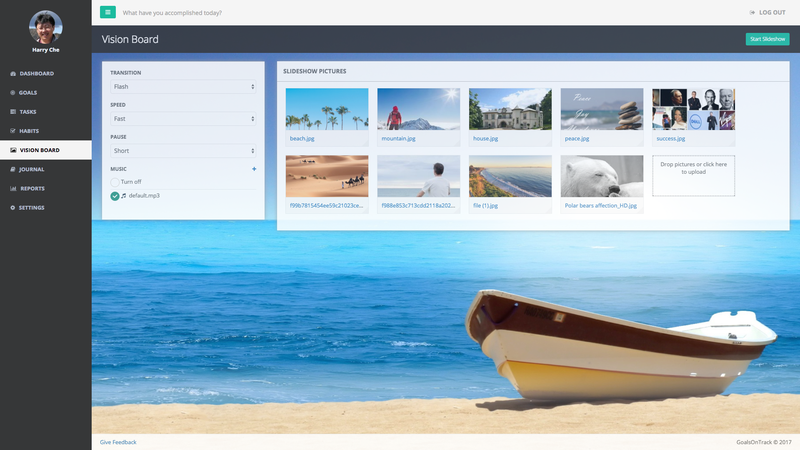
GoalsOnTrack takes a methodical approach to goal setting. It's built on the SMART goal framework and adds features like sub-goals, milestones, habit tracking, and even a vision board to keep you motivated. During testing, we appreciated how the SMART wizard forced us to define measurable criteria upfront — something easier to skip in less structured apps.
What GoalsOnTrack does well
- SMART framework built-in — The app guides you through creating Specific, Measurable, Attainable, Relevant, and Time-bound goals. Good for beginners who need structure.
- Goal journaling — Built-in journal for reflection on progress, obstacles, and lessons learned. This reflective practice is underrated for goal achievement.
- Sub-goals and milestones — Break big goals into smaller, trackable steps with deadlines.
- Vision board — Visualize target outcomes with images and steps. A useful feature for maintaining long-term focus.
Where it falls short
- Dated interface — The UI feels several years behind modern productivity apps. Functional, but not inspiring.
- No collaboration — Individual use only. No team or family features.
- Web-focused — Mobile experience is limited compared to native apps like Strides.
Pricing
$68/year (all features included) | Free trial available
Best for: Individuals who want a SMART-based goal setting app with journaling and visualization — and don't mind a less polished interface.
6. TickTick — Best for Task-Integrated Goal Tracking
Ideal for: Productivity enthusiasts who want goals, tasks, habits, and calendar in one app
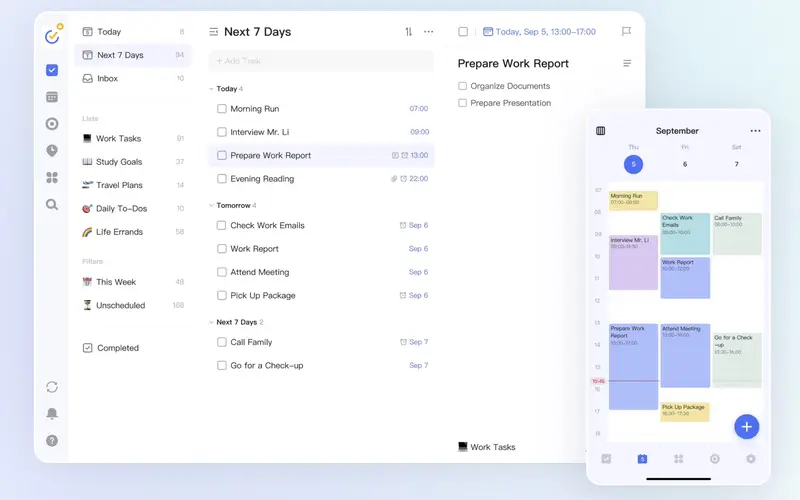
TickTick is a goal tracking app that bridges the gap between task management and structured goal setting. If your goals involve daily actions — study for 30 minutes, exercise 4 times a week, complete project milestones — TickTick connects these tasks directly to your bigger objectives. We found the Pomodoro timer particularly effective for "deep work" goals — timer sessions automatically logged against the associated task.
What TickTick does well
- All-in-one productivity — Task lists, habit tracker, Pomodoro timer, and calendar in a single app. Your goals and daily actions live in the same place.
- Cross-platform — Available on iOS, Android, web, Mac, Windows, and even as browser extensions.
- Built-in calendar — Drag-and-drop scheduling makes it easy to block time for goal-related work.
- Habit tracking — Track daily habits with streaks and completion charts, connected to your task workflow.
Where it falls short
- Goals are secondary — TickTick is a task manager first. Goal tracking feels like an add-on rather than a core feature.
- No goal frameworks — No OKR, SMART, or structured goal methodology. You're building your own system with lists and tags.
- Limited collaboration — Basic list sharing exists, but there's no team goal alignment or progress dashboards.
Pricing
Free: Basic features | Premium: $35.99/year
Best for: People who want a goal setting app that doubles as a task manager — no switching between apps.
7. Habitica — Best for Gamified Goal Tracking
Ideal for: Anyone who struggles with motivation and wants to make goal tracking fun
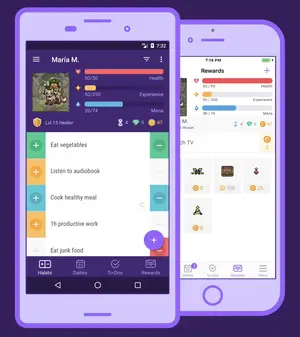
Habitica takes a completely different approach. It turns your goals and habits into an RPG (role-playing game). Complete tasks to earn gold, level up your character, and unlock gear. Skip tasks and your character takes damage. The RPG layer may look unconventional, but the behavioral science behind it — immediate feedback loops and variable rewards — is well-established. In our testing, the "party" feature (where teammates lose HP if you skip habits) created surprisingly strong accountability.
What Habitica does well
- Gamification that works — The RPG mechanics tap into the same reward loops that make games addictive. Completing real-life tasks feels more satisfying when you're also leveling up a character.
- Community challenges — Join group challenges for extra accountability and social motivation. The community is active and supportive.
- Free and open-source — The core experience is completely free. Habitica is open-source, which means transparency and community-driven development.
- Cross-platform — iOS, Android, and web.
Where it falls short
- Niche appeal — The RPG aesthetic isn't for everyone. Professionals may find it hard to take seriously.
- No structured frameworks — No OKR, SMART, or goal hierarchy. You create habits, dailies, and to-dos — that's it.
- No team goal tracking — Group challenges exist, but there's no business goal alignment or progress reporting.
Pricing
Free: Full core experience | Subscription: $4.99/month (cosmetic extras, gems)
Best for: People who need a goal setting app with built-in motivation mechanics. Not suitable for professional or team goal management.
How to Choose the Right Goal Setting App
Choosing the best goal setting app depends on three factors:
1. What kind of goals are you setting?
- Personal habits and milestones → Strides (iOS) or GoalsOnTrack
- Mixed tasks and goals → TickTick
- Team or company OKRs → AimLinked or Weekdone
- Any goals, any level → AimLinked
2. Do you need collaboration?
- Solo only → Strides, GoalsOnTrack, Habitica
- Team/Family → AimLinked, Weekdone
- DIY collaboration → Notion
3. What's your budget?
- Free goal setting app → AimLinked (core features), Notion (personal), Habitica (full experience)
- Under $5/month → Strides Plus, Habitica subscription
- Team pricing → Weekdone ($10.80+/user/month), AimLinked (paid team plans)
Quick decision guide
| Your Situation | Our Recommendation |
|---|---|
| Want one app for personal, family, team, and enterprise goals | AimLinked |
| iOS user focused on personal habits | Strides (4.8★ App Store) |
| Already using Notion for everything | Notion (add goal templates) |
| Team needs OKR coaching and check-ins | Weekdone |
| Want task manager + goal tracker combined | TickTick (4.7★ App Store, 4.5★ Google Play) |
| Need motivation through gamification | Habitica (100K+ active users) |
| Want SMART goals with journaling | GoalsOnTrack |
Honorable Mentions
These goal setting apps didn't make our top 7 but deserve recognition for specific use cases:
- ClickUp — Powerful project management platform with built-in goal tracking. Best for teams already using ClickUp for task management who want to add OKR tracking without switching tools.
- Asana — Offers goal tracking as part of its Business plan ($24.99/user/month). Strong for teams that need project + goal management combined.
- Todoist — While primarily a task manager, Todoist's Boards and Filters can be configured for basic goal tracking. Good for GTD practitioners.
- Monday.com — Highly visual work management platform with OKR templates. Best for mid-size teams wanting customizable dashboards.
Start Tracking Your Goals Today
Seven goal setting apps, seven different strengths. Strides gives iOS users the cleanest personal tracking experience. Weekdone pairs OKR coaching with structured check-ins for teams. Habitica turns goals into a game — and it works better than you'd expect. GoalsOnTrack is the best goal setting app for SMART methodology purists.
The right goal setting app depends on who you're tracking goals for and how much structure you need. If you want one platform that handles personal, family, team, and enterprise goals — with a priority-focused dashboard, measurable key results, goal assignment to any profile, six participant roles, and built-in tasks and analytics — AimLinked is built for exactly that.
Try AimLinked Free — No Credit Card Required →
Editorial disclosure: This article is published by AimLinked, which is one of the products reviewed below. We've included AimLinked alongside six independently developed apps and applied the same evaluation criteria to all seven. Where we have a commercial interest, it is clearly marked with CTAs. We encourage you to try multiple options before deciding.
FAQ
Frequently Asked Questions
A goal setting app is software that helps you define, track, and achieve your objectives. These apps provide structure — whether through frameworks like OKR or SMART — along with progress tracking, reminders, and visual dashboards to keep you accountable. The best goal setting software adapts to your workflow rather than forcing you into a rigid process.
A habit tracker focuses on daily routines — things you want to do consistently, like exercising or reading. A goal tracker app focuses on outcomes — things you want to achieve by a certain date, like running a marathon or launching a product. Many apps combine both. TickTick and AimLinked handle both goals and habits, while Strides specializes in personal habit tracking.
OKR stands for Objectives and Key Results. It's a goal-setting framework created by Andy Grove at Intel in the 1970s and later popularized by John Doerr who introduced it at Google in 1999. You set an Objective (what you want to achieve) and define 2-5 Key Results (measurable outcomes that prove you achieved it). OKR works at every level — personal, team, and company. Data reported by PerformYard suggests that by year 4 of consistent performance management, goal completion rates can reach 92%. More on OKRs...
Yes, several options work for this. AimLinked supports personal goals, family goals, team OKRs, and enterprise objectives in one platform — with tag-based context switching on the Dashboard (switch between work, family, and personal views), privacy controls, role-based permissions, and even built-in CRM, calendar, and chat so you don't need to switch between apps. TickTick also handles personal and professional tasks, though without OKR structure. Most other apps focus on either personal (Strides, Habitica) or team (Weekdone) — not both.
Yes. Several excellent apps offer useful free tiers. Habitica's entire core experience is free and open-source — making it the best free goal setting app for gamification fans. Notion offers unlimited personal use. AimLinked's free plan is unusually generous — it includes unlimited goals, teams and groups, charts, tasks with effort tracking, Observer and Member roles, and CSV import, all with no time limit. The free versions typically limit advanced features like goal hierarchy or supervisor workflows, but they're more than enough to get started.
Not all apps support team use. AimLinked offers the deepest collaboration — six participant roles (Observer through Supervisor) with granular permissions, approval workflows with an immutable audit trail, effort tracking on initiatives, and the ability to assign a goal to any profile (a person, team, department, or entire company). Weekdone is also built for team OKR alignment. Notion can be adapted for team goal tracking with custom databases. Apps like Strides, GoalsOnTrack, and Habitica are designed for individual use only.
Research suggests they do — when used consistently. Goal-setting theory by Locke and Latham shows that setting specific, challenging goals leads to 90% better performance than vague intentions. Apps provide the structure, reminders, and accountability that make consistent goal tracking easier. The key is choosing an app you'll actually use.
Habitica leads here — the entire core RPG experience is free with no feature restrictions. For structured goal tracking, AimLinked's free tier stands out: unlimited goals, teams, charts, tasks with effort tracking, and CSV import — all free with no time limit. Notion's free personal plan is unlimited but requires manual setup. Strides limits free users to just 3 trackers.


- 11/14/2025
- 350
4 Simple Questions to Get to Life's Purpose
At some point, we all start wondering: why are we…
