AimLinked Brief Description
AimLinked Docs
AimLinked Brief Description
Goal Management App for Individuals, Teams, and Organizations

Contributor:

Serge Tikhonchuk
7 months, 3 weeks ago
A goal management app is software that helps you define objectives, track progress with measurable results, and coordinate with other people — whether that's a family, a team, or an entire organization. Unlike simple to-do lists, a goal management app connects what you want to achieve with how you'll measure success and who's involved.
Most tools in this category force you to choose: personal habits or team OKRs. Simple checklists or enterprise workflows. AimLinked doesn't make you choose. It covers everything from a personal fitness target to a company-wide OKR program — and every level in between.
Whether you're tracking New Year's resolutions with your family, aligning quarterly objectives at your startup, or rolling out structured goal tracking across a corporation — AimLinked gives you the structure, roles, and analytics to keep everyone accountable. Teams that need OKR rigor get it. Individuals who just want to stay on track get simplicity. Same app.
TL;DR — AimLinked in 30 Seconds
- What: A goal management app for individuals, families, teams, and organizations — all in one platform
- Key features: Priority-focused Dashboard, goal trees (hierarchies), measurable key results with metrics, six participant roles, approval workflows, audit log
- Free plan: Unlimited goals, metrics, teams, charts, tasks — no credit card, no time limit
- Paid plans: Pro ($7/user/mo) for goal trees and advanced roles; Corp ($12/user/mo) for approval workflows, audit log, and private deployment
- Platform: Web application (PWA planned). No native mobile apps yet
- Get started: Create a free account — set your first goal in under two minutes
Table of Contents
- What Makes AimLinked Different
- Is AimLinked Right for You?
- Dashboard — Your Priorities, Front and Center
- Goals — The Core of Every Goal Management App
- Goal Trees — From Company Vision to Daily Tasks
- Key Results and Metrics — Measure What Matters
- Teams and Connections — Built for Collaboration
- Initiatives — Bridge Goals to Execution
- Roles and Permissions — The Right Access for Every Participant
- Goal Workflow and Approval — Alignment Without Micromanagement
- Plans and Pricing
- Additional Features
- What AimLinked Doesn't Do (Yet)
- Frequently Asked Questions
- Getting Started — 3 Steps, Under 5 Minutes
What Makes AimLinked Different
Most goal tracking apps solve one problem well. A habit tracker handles daily routines. An OKR app manages team objectives. A task manager organizes your to-do list. But if your life includes personal goals and team goal tracking and organizational objectives, you end up juggling three separate tools.
AimLinked is a goal management app built to handle all of these in one place. Here's what sets it apart as both goal setting software and an OKR tracking software solution:
- Priority-focused Dashboard — See your top 3 goals and tasks ordered by importance, not by recency. Tag goals by context (work, family, personal) and switch views instantly. Stop procrastinating on easy tasks while important ones wait.
- Goal trees — Decompose complex objectives into a hierarchy of sub-goals, aligning company strategy with team and individual targets. One structure that works from CEO-level vision down to an individual contributor's weekly tasks.
- Role-based collaboration — Six participant roles with granular permissions, from Observer (view only) to Supervisor (approve and confirm). Few goal management apps offer this depth of access control.
- Measurable progress — Attach metrics with target values, record assessments over time, and visualize trends with interactive charts. This goal tracking app shows whether you're on track without guesswork.
- Approval workflows — Goals (called "Aims" in the app) follow a structured lifecycle from Draft through Proposal, Approval, Execution, and Confirmation. Available on the Corporate plan for organizations that need accountability at every stage.
- Assign goals to anyone — Add a person, a department, or your entire company to a goal with a single action. Participants then create their own sub-goals and tasks. One goal, shared ownership.
- Multi-segment flexibility — Works for individuals, families, teams, and enterprises in a single platform. One of the few OKR apps that scales from personal goals to company-wide programs.
Is AimLinked Right for You?
AimLinked serves four distinct audiences. Each uses the platform differently, and each has a plan designed for their needs.
| Audience | Plan | Typical Use Cases |
|---|---|---|
| Individuals | Free | Personal development goals, life objectives, habit tracking |
| Families | Free | Shared family goals — vacations, savings, fitness, education |
| Small teams and startups | Pro | Team goal tracking, project objectives, quarterly OKRs |
| Leaders and managers | Pro | Multi-level goal trees, OKR tracking software for teams |
| Organizations and enterprises | Corp | Company-wide OKR programs, org-chart alignment, compliance |
Not sure where to start? Create a free account and set your first aim in under two minutes. You can upgrade anytime as your needs grow.
Dashboard — Your Priorities, Front and Center
Most goal-tracking tools show you everything at once — a wall of goals, tasks, and notifications that leaves you deciding what to work on next. AimLinked's Dashboard takes a different approach: it shows your top 3 goals and tasks prioritized by goal importance, so you always see what matters most.
Why does this matter? People naturally gravitate toward easy, low-stakes tasks — answering emails, organizing files, ticking off minor items. It feels productive, but the important goals stay untouched. This is procrastination disguised as busyness. AimLinked's Dashboard cuts through this by surfacing the tasks tied to your highest-priority goals first.
Tag-Based Context Switching
Life isn't one-dimensional, and neither are your goals. You might have work OKRs, a family vacation fund, and a personal fitness target — all active at the same time. AimLinked lets you tag goals by context (office, family, personal, or any custom tag) and filter your Dashboard accordingly.
- At the office → switch to your work tag and see only professional priorities
- At home → switch to family or personal tags and leave work behind
- Planning your week → view all tags for a full picture
No more work deadlines overshadowing your family goals, and no more personal tasks cluttering your team view. Each context gets the attention it deserves — a feature that makes AimLinked practical for people who manage multiple areas of life.
Goals — The Core of Every Goal Management App
Everything in AimLinked starts with a goal. In the interface, goals are called Aims. Each aim represents an objective you want to achieve — alone or with others. Unlike simple task lists, aims carry structure: they have statuses, participants, due dates, visibility controls, and a defined lifecycle.
Every aim has:
- Title and description — what you're trying to achieve and why
- Status — tracks where the goal is in its lifecycle (see Goal Workflow)
- Due date and optional finish date — accountability built in
- Participants — people assigned to work on the aim, each with a specific role
- Visibility — private (only participants) or public (visible on Discover)
Goals can be standalone or organized into hierarchical goal trees — AimLinked's most powerful feature for team goal tracking.
Goal Statuses
Each goal moves through a clear lifecycle. The available statuses depend on your plan.
| Status | Free / Pro | Corp | What It Means |
|---|---|---|---|
| Draft | Yes | Yes | Newly created, still being defined. Freely editable. |
| Proposed | — | Yes | Submitted for Supervisor approval. |
| Approved | — | Yes | Accepted by Supervisor, ready to start. |
| Ongoing | Yes | Yes | Actively being worked on. |
| Completed | Yes | Yes | Lead/Owner marks as done. Awaits confirmation on Corp. |
| Confirmed | — | Yes | Supervisor confirms completion. Final state. |
| Cancelled | Yes | Yes | Abandoned. Can be restored to Draft. |
| Failed | Yes | Yes | Did not achieve the objective. |
Goal Trees — From Company Vision to Daily Tasks
This is AimLinked's key differentiator as a goal management app. Goal trees let you organize objectives into a hierarchy — a structure where high-level strategic objectives decompose into team goals, which further break down into individual targets.
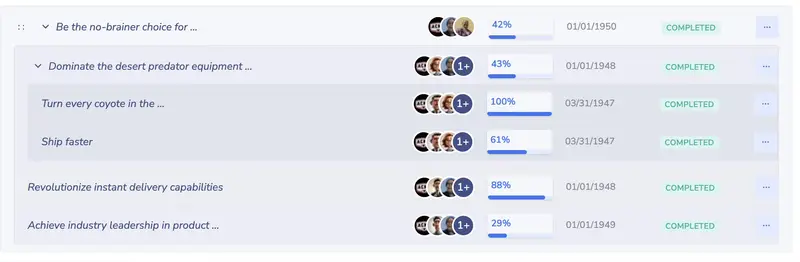
How goal trees work:
- Start with a top-level objective (company vision, personal ambition, or family goal)
- Add sub-goals as children — each with its own metrics, participants, and deadlines
- Progress rolls up automatically from children to parents
- Aims can be reordered via drag-and-drop in the AimLinked interface
- No depth limit — nest as many levels as your structure requires
Why this matters: Most goal setting software treats goals as flat lists. When your team's quarterly OKR is connected to the company's annual objective — and both are visible in the same tree — team goal tracking happens naturally. No spreadsheets. No "where does my work fit in?" questions. AimLinked brings this structure to every level — from personal goals to company-wide OKR programs.
Goal trees require the Pro or Corp plan. Free plan users get single-level goals.
Key Results and Metrics — Measure What Matters
Setting a goal is the easy part. Knowing whether you're actually making progress — that's where most tools fall short. AimLinked solves this with Key Results and Metrics, turning vague objectives into measurable, trackable outcomes.
Why Goals Alone Aren't Enough
You can create a goal with just a title — "Pass my exams." Simple. But is it enough to actually get there?
Think about why you want to pass. Maybe you need a certification for a new role, or a minimum grade for university admission. That means you need to be able to solve, say, 80% of the test exercises. Now you have something measurable: a readiness score you can track over time. Instead of hoping you're prepared, you know — because you've been measuring it for weeks.
This is the power of the goals → key results → metrics pipeline:
- Goal — what you want to achieve ("Pass the certification exam")
- Key Result — how you know you achieved it ("Score 80% or higher on practice tests")
- Metric — the number you track (practice test score, measured weekly)
You can absolutely use AimLinked as a simple goal list — just create aims and mark them complete. But when you're serious about reaching an objective, adding key results and metrics transforms vague intentions into a trackable path. AimLinked supports both approaches.
The OKR framework — Objectives and Key Results, popularized by Andy Grove at Intel and later by John Doerr in Measure What Matters — is built on exactly this principle. AimLinked implements it directly.
Key Results are measurable outcomes attached to a goal. They answer: "How do we know if we achieved this goal?"
Each Key Result links to a metric — a quantitative measure with:
- Title (e.g., "Monthly Revenue", "Customer Satisfaction Score", "Weight")
- Unit (%, $, kg, points, or custom)
- Target value (what you're aiming for)
- Initial value (your starting point)
- Category (organize metrics by theme)
Assessments — Track Progress Over Time
Assessments are individual measurements recorded against a metric. Each one captures a value, date, status, and source. Record assessments manually, via API, or through CSV import — a level of measurement flexibility that few competing tools provide.
AimLinked automatically calculates progress as a percentage from initial to target value based on the latest assessment. No manual percentage entry — the math is always accurate.
Interactive Charts
Metric history is visualized with interactive line charts, showing your trend of assessments over time. Charts update automatically when new assessments are added — so you always see whether you're accelerating, plateauing, or falling behind. This visual tracking is what makes AimLinked data-driven rather than just another checklist.
Teams and Connections — Built for Collaboration
Meaningful goals are rarely achieved alone. AimLinked makes collaboration central to the experience through profile connections and groups.
Profiles represent individuals in AimLinked. Each profile includes name, avatar, bio, location, timezone, contact information, and a list of goals and metrics they participate in.
Groups are organizational profiles that represent teams, departments, or organizations. They can have their own goals and sub-groups, creating an organizational hierarchy that mirrors your real structure — essential for team goal tracking.
How Connections Work
In the AimLinked interface, connections are called Links — you'll find them in the main menu. You collaborate by creating links between profiles — connecting yourself to colleagues, friends, or family members. Once linked, you can invite each other to goals, share metrics, and track collective progress.
This model works equally well for: - Families — link family members, create shared goals (vacation fund, home renovation) - Teams — link team members, align on quarterly OKRs using the OKR app features - Organizations — connect departments through group profiles, build org-wide goal trees
Assign Goals to Any Profile — Person or Group
Here's what makes AimLinked's collaboration different from most goal setting software: you can assign a goal to any profile, whether it's a person or a group. As the goal owner, adding a participant is a single action — select a family member, a department, or your entire company.
Once assigned, participants can contribute in their own way: create sub-goals for themselves, set tasks, log effort, or simply follow progress. This turns a personal aim into a shared effort without complex setup.
Practical examples: - Family vacation — assign the goal to your family group. Each member creates their own sub-goals (save $500, research flights, book accommodation). - Department OKR — assign a quarterly objective to your team. Each team member adds their individual key results and tasks. - CEO transparency — assign your company's strategic aim to the company profile as Followers. Everyone sees the direction without cluttering their own task list.
Initiatives — Bridge Goals to Execution
Goals define what you want to achieve. Initiatives define how you'll get there. They bridge the gap between objectives and the actual work that drives progress. In the AimLinked interface, you'll find initiatives under the Tasks menu.
| Type | Use For |
|---|---|
| Task | A single actionable work item |
| Project | A larger effort with sub-tasks |
| Program | A collection of related projects |
| Action item | General initiative |
| Meeting | Scheduled discussion or review |
Initiatives follow the same status workflow as goals (Draft → Ongoing → Completed, with Proposed → Approved → Confirmed available on the Corp plan) and support effort tracking — participants log time and work, which supervisors can confirm or reject.
Why this matters: Most goal tracking apps stop at "track progress." AimLinked goes further by connecting your daily tasks directly to your goals. When you complete a task and achieve results, the associated aim's progress reflects it. Your to-do list is always aligned with what matters most — a key advantage for any team goal tracking workflow.
Roles and Permissions — The Right Access for Every Participant
Features and dashboards are only useful if the right people have the right access. Not everyone on a goal needs the same level of control. A CEO observing company-wide progress needs different permissions than a team lead managing daily execution. AimLinked handles this with six distinct participant roles — more granularity than most goal setting software provides.
| Free/Pro Role | Corp Role | What They Can Do |
|---|---|---|
| Follower | Observer | View goals and progress. No edit access. |
| Member | Participant | Participate in goals. Log progress and effort. |
| Lead | Owner | Full control. Create, edit, assign, delete. |
| — | Admin | Administrative access. Same capabilities as Owner. |
| — | Supervisor | Approve goals, confirm completion, accept/reject assessments. |
| — | Deputy Supervisor | Same as Supervisor. Serves as backup. |
What Each Role Can Do
| Action | Follower/Observer | Member/Participant | Lead/Owner | Admin | Supervisor | Deputy |
|---|---|---|---|---|---|---|
| View goal and progress | Yes | Yes | Yes | Yes | Yes | Yes |
| Log effort on initiatives | — | Yes | Yes | Yes | — | — |
| Edit goal | — | — | Yes | Yes | — | — |
| Add/remove participants | — | — | Yes | Yes | — | — |
| Propose goal for approval | — | — | Yes | Yes | Yes | Yes |
| Approve/reject proposed goals | — | — | — | — | Yes | Yes |
| Confirm completion | — | — | — | — | Yes | Yes |
| Accept/reject assessments | — | — | — | — | Yes | Yes |
| Add sub-goals and initiatives | — | Yes | Yes | Yes | Yes | Yes |
| Delete goal | — | — | Yes | Yes | Yes | Yes |
This level of role granularity is unusual — most competitors offer only "viewer" and "editor." AimLinked's six roles let you model real organizational dynamics: a CEO can observe without cluttering the interface, a project coordinator can manage without being the goal owner, and a supervisor can enforce quality without blocking daily work.
Goal Workflow and Approval — Alignment Without Micromanagement
Goals aren't static — they move through a lifecycle. AimLinked structures this lifecycle so everyone knows what stage a goal is at, who needs to act next, and what happens when. This structured workflow is what separates a true OKR tracking software from a basic task list.
Free and Pro Plans
For teams and families, goals follow a simple lifecycle:

The owner creates an aim in Draft, starts it (Ongoing), and marks it Completed when done. No approvals needed — full autonomy. This simple workflow makes AimLinked easy to use for personal goals and small teams.
Corp Plan (With Supervisor)
When a supervisor is assigned, goals follow a structured approval process:
The approval flow in practice:

- Draft — Owner creates and refines the goal
- Proposed — Owner submits for supervisor review
- Approved — Supervisor accepts; owner starts work
- Ongoing — Active work; progress tracked via metrics and assessments
- Completed — Owner signals "done"
- Confirmed — Supervisor verifies and confirms completion
Why Organizations Need This
Goals take months to achieve. Along the way, details fade — what exactly was agreed, what metrics were set, what "success" meant at the start. When annual bonuses, promotions, or project funding depend on goal completion, that ambiguity becomes a real problem.
Without a structured process, initial objectives can quietly drift. A team remembers the goal one way; a manager remembers it differently. By the time the review period arrives, the original intent is lost — leading to confusion, disputes, and eroded trust on all sides.
Goals should adapt to changing circumstances. But adaptation should be transparent and audited, not silent. AimLinked's approval workflow ensures that:
- Initial goals are locked in — the Proposed → Approved flow captures what was agreed and when
- Changes go through a visible process — no silent edits to commitments mid-cycle
- Completion is verified — a Supervisor confirms the result, not just the goal owner
- Everything is recorded — the Audit Log preserves every status transition, edit, and decision
This means managers and teams can point to the same documented record. If goals need to change — and they will — the change is tracked, not hidden. That's the difference between a tool built for real organizational dynamics and one that just stores a list of objectives.
Plans and Pricing
AimLinked offers three plans. Every plan includes cloud hosting, and the Corp plan adds the option for private server deployment.
Feature Comparison
| Feature | Free | Pro | Corp |
|---|---|---|---|
| Goals | |||
| Create goals | Yes | Yes | Yes |
| Goal trees (sub-goals) | No (1 level) | Full hierarchy | Full hierarchy |
| Goal approval workflow | — | — | Yes |
| Metrics and Tracking | |||
| Assessments per metric | 1000 | 10,000 | Unlimited |
| CSV import (rows per file) | 1000 | 10,000 | 100,000 |
| Charts and analytics | Yes | Yes | Yes |
| Assessment approval | — | — | Yes |
| Teams and Roles | |||
| Teams and groups | Yes | Yes | Yes |
| Observer and Member roles | Yes | Yes | Yes |
| Owner (Lead) role | — | Yes | Yes |
| Supervisor role | — | — | Yes |
| Admin and Deputy Supervisor | — | — | Yes |
| Initiatives | |||
| Tasks and projects | Yes | Yes | Yes |
| Effort tracking | Yes | Yes | Yes |
| Organization | |||
| Org structure (hierarchy) | — | — | Yes |
| Audit log (change history) | — | — | Yes |
| Deployment | |||
| Cloud application | Yes | Yes | Yes |
| Private server | — | — | Yes |
| Support | |||
| Community and email | Yes | Yes | Priority |
Pricing
| Plan | Monthly | Quarterly (3 months) | Best For |
|---|---|---|---|
| Free | $0 /user | $0 /user | Individuals and families |
| Pro | $7 /user/mo | $42 /user/quarter | Team leaders and small teams |
| Corp | $12 /user/mo | $72 /user/quarter | Organizations and enterprises |
The Free plan is permanent — no trial period, no credit card required. Start with Free and upgrade when you need goal trees, advanced roles, or organizational features.
Additional Features
Beyond the core goal management system, AimLinked includes several supporting tools that enhance collaboration, compliance, and day-to-day usability.
Audit Log (Corp Plan)
The Corporate plan includes an immutable audit log — a chronological record of every change made to a goal and its participants. This is a feature that sets AimLinked apart from most competitors. Goal edits, status transitions, participant additions, role changes, and assessment approvals are all tracked. Entries cannot be edited or deleted, even by administrators.
For regulated industries and compliance-conscious organizations, this is built-in accountability without a third-party audit tool.
Discover
Browse public goals and profiles without logging in. See what objectives others are working on, find inspiration from public goal structures, and discover people and organizations using AimLinked.
Visit Discover to explore public aims and profiles.
CRM — Contacts and Companies
AimLinked includes a lightweight CRM for managing business contacts, companies, and leads. Tag contacts, classify companies by industry, and track business opportunities — all connected to your goal-tracking workflow.
Calendar and Chat
Built-in calendar for scheduling goal reviews, team check-ins, and milestone deadlines. The integrated chat system keeps team communication in one place — less context-switching between tools for goal-related discussions.
Security and Privacy
AimLinked stores your data securely with encrypted connections (HTTPS). The Corp plan offers private server deployment for organizations that need to keep data on their own infrastructure. All plans include account-level access controls, and the Corp plan adds a full audit log for compliance. The audit log operates subject to applicable data protection regulations.
Platform Availability
AimLinked is currently a web application accessible from any modern browser on desktop, tablet, or mobile. A Progressive Web App (PWA) is planned for enhanced mobile experience. All features work in the browser — no downloads required.
What AimLinked Doesn't Do (Yet)
No goal tracking app does everything, and transparency matters. Here's what AimLinked currently does not offer:
- Native mobile apps — AimLinked is web-only for now. A PWA is planned. The web app works on mobile browsers, but there are no iOS or Android apps yet.
- Third-party integrations — AimLinked doesn't yet offer Zapier, Slack, or Jira integrations. API access is available for custom integrations.
- Time tracking — Effort tracking on initiatives captures work logged by participants, but it's not a full time-tracking tool like Toggl or Clockify.
- Gantt charts — Project timelines are not visualized as Gantt charts. AimLinked focuses on goal hierarchies and progress metrics rather than scheduling.
- AI features — There are no AI-powered goal suggestions or automated insights at this stage.
These are active areas of development. AimLinked focuses on what it does best — structured goal hierarchies, measurable key results, and role-based collaboration. Check the blog for updates on upcoming features.
Frequently Asked Questions
Is AimLinked a free goal management app?
Yes. The Free plan includes unlimited goals (aims), metrics, 1000 assessments per metric, teams and groups, charts, tasks with effort tracking, and Observer and Member roles. No credit card required, no time limit.
What's the difference between an aim and a task in AimLinked?
An aim (goal) is what you want to achieve (the outcome). A task (initiative) is how you'll get there (the work). Aims have metrics and progress tracking. Tasks have effort tracking and can be individual items, projects, programs, or meetings. In the app menu, you'll find them under "Aims" and "Tasks" respectively.
How is progress calculated?
Progress is calculated automatically:
(Current Value − Initial Value) / (Target Value − Initial Value) × 100%.
The "current value" is taken from the most recent approved assessment. No manual updates needed — AimLinked handles the math for you.
Can I import data from spreadsheets?
Yes. AimLinked supports CSV import for bulk-loading metric assessments. Download a template, fill in your data, and upload. Row limits: Free (1000), Pro (10,000), Corp (100,000).
What happens to my data if I downgrade?
Your data is never deleted. If you downgrade from a paid plan: metrics beyond the limit become read-only, goal trees beyond one level are preserved but you can't create new sub-goals, and roles above your plan level become inactive. AimLinked keeps all your history safe.
Can I deploy AimLinked on my own servers?
Yes. The Corp plan includes private server deployment. Contact info@aimlinked.com for self-hosted setup.
Is there a mobile app?
AimLinked is currently web-only — it works in any modern browser on desktop, tablet, or mobile. A Progressive Web App (PWA) is planned to improve the mobile experience. No native iOS or Android apps are available yet.
Can AimLinked be used as an OKR app?
Absolutely. AimLinked works as both a goal management app and a dedicated OKR tool. Set objectives (aims), attach measurable key results with metrics, track progress with assessments, and build goal trees that cascade from company level to individual contributors. The Pro and Corp plans provide the goal hierarchy and team goal tracking features that OKR programs require.
Where can I access AimLinked?
AimLinked is available at aimlinked.com. Sign up for free and start setting your first goals immediately.
Getting Started — 3 Steps, Under 5 Minutes
You don't need to configure anything complex to start using AimLinked. Here's how:
- Create your account — Sign up at aimlinked.com, confirm your email, and complete your profile. Takes about a minute.
- Set your first goal — From the Dashboard, click "+ New Goal." Give it a specific title, an optional description, and a due date. Click Save.
- Add a key result — Open your goal, go to the Results tab, and create a metric with a target value. AimLinked will track your progress automatically from there.
That's it. You have a goal, a measurable outcome, and a progress tracker. From here you can invite people, build goal trees, add tasks, or simply track your own progress.
Get Started with AimLinked
Ready to try a goal management app with real structure, collaboration, and accountability? Whether you need personal goal tracking, a team solution, or a full OKR program for your organization — AimLinked scales with you.
- 03/12/2026
- 63
Best Goal Setting Apps in 2026: 7 Tools Compared and Ranked
Editor's Pick: If you want one goal setting app …


- 11/14/2025
- 351
4 Simple Questions to Get to Life's Purpose
At some point, we all start wondering: why are we…